How can Bridgestone become the easiest commercial partner for Fleet Managers to do business with?
…aka create a Fleet Portal that brings all of Bridgestone’s tools and data together in one seamless experience.

The background
(aka introducing the client and the project)
Even if you don't drive, you've probably heard of Bridgestone; the world's largest tyre and rubber company. Through their Fleet Care offering, Bridgestone America provide tools and services to help US Fleet Managers with their day-to-day operations. This includes support for tyre monitoring, vehicle servicing, route optimisation, billing, and regulatory compliance.
Bridgestone America partnered with TCS Interactive (TCSi) to reimagine the day-to-day experience for Fleet Managers. Before we kicked off, Bridgestone had already conducted extensive research into existing pain points and aligned internally on the need for a unified digital experience. What they needed from TCSi was our creative and strategic support to shape the vision of the new experience and deliver practical solutions that would genuinely make things better for Fleet Managers.
The problem
(aka what we heard)
Fleet managers are burdened by a patchwork of disconnected tools and systems, requiring manual workarounds. Customers often have to rely on support from Bridgestone to access basic data or manage settings.
This complexity, and lack of self-service, means customers have to spend more time managing Bridgestone’s tools and systems than they do with other vendors; driving up operational costs. The lack of real-time dashboards also delay crucial decision-making and restricts proactive management of fleets and service events.
Although a unified portal was an obvious solution to many of the existing problems, the stakes were high. Customers had been waiting too long for change, and patience was running thin. A misstep now could cause further, irreversible harm to already strained customer relationships. No pressure then! 🫠
The approach
(aka what we did to find the right solutions)
We kicked things off with an ‘Understand Context’ phase (perhaps more commonly known as a 'Discover' phase). This involved interviewing stakeholders and customers, digging through existing research, auditing existing tools and systems, and competitor audits. This work validated what we’d heard from the client and helped us to identify what customers need from the new portal; KPIs & reporting, dealer & inventory visibility, cradle-to-grave tracking, and proactive analytics
One thing that stood out: the competitor audits helped Bridgestone understand that users will be judging the portal against every best-in-class digital experiences they use – not just other portals from direct competitors. Expectations are high!
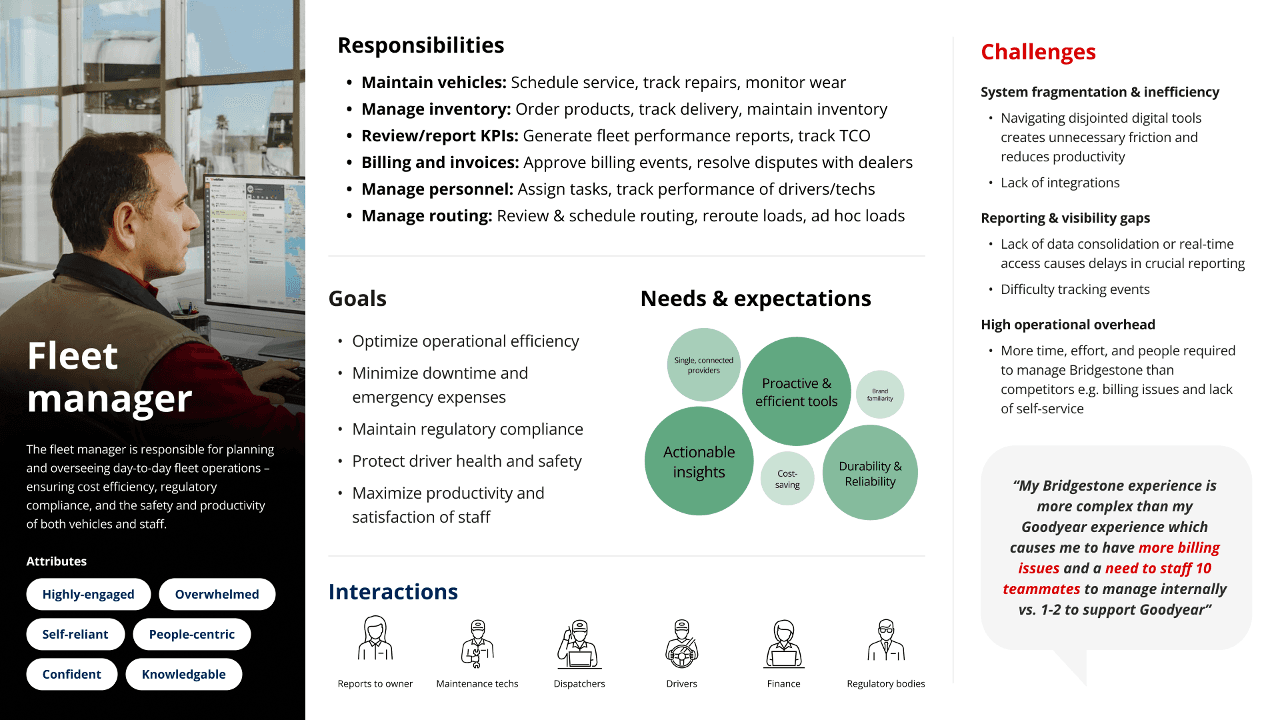
Next up, we ran some collaborative workshops to map out a “day in the life” of a Fleet Manager. We used the output from these workshops to create a Fleet Manager persona, start generating ideas for the new portal, and defining core principles for the portal vision.
Fleet manager persona
Core principles for portal vision




After the workshops, we defined what success would look like for the new fleet portal and shaped the product model and IA around real Fleet Manager needs.
This all led to the creation of the Fleet Portal vision, laying the foundations for an improved Bridgestone experience. By grounding the vision in business requirements, real customer needs, and tech feasibility, we created something that genuinely excited the Bridgestone team but also gave them confidence to support and deliver it through a practical sprint plan.
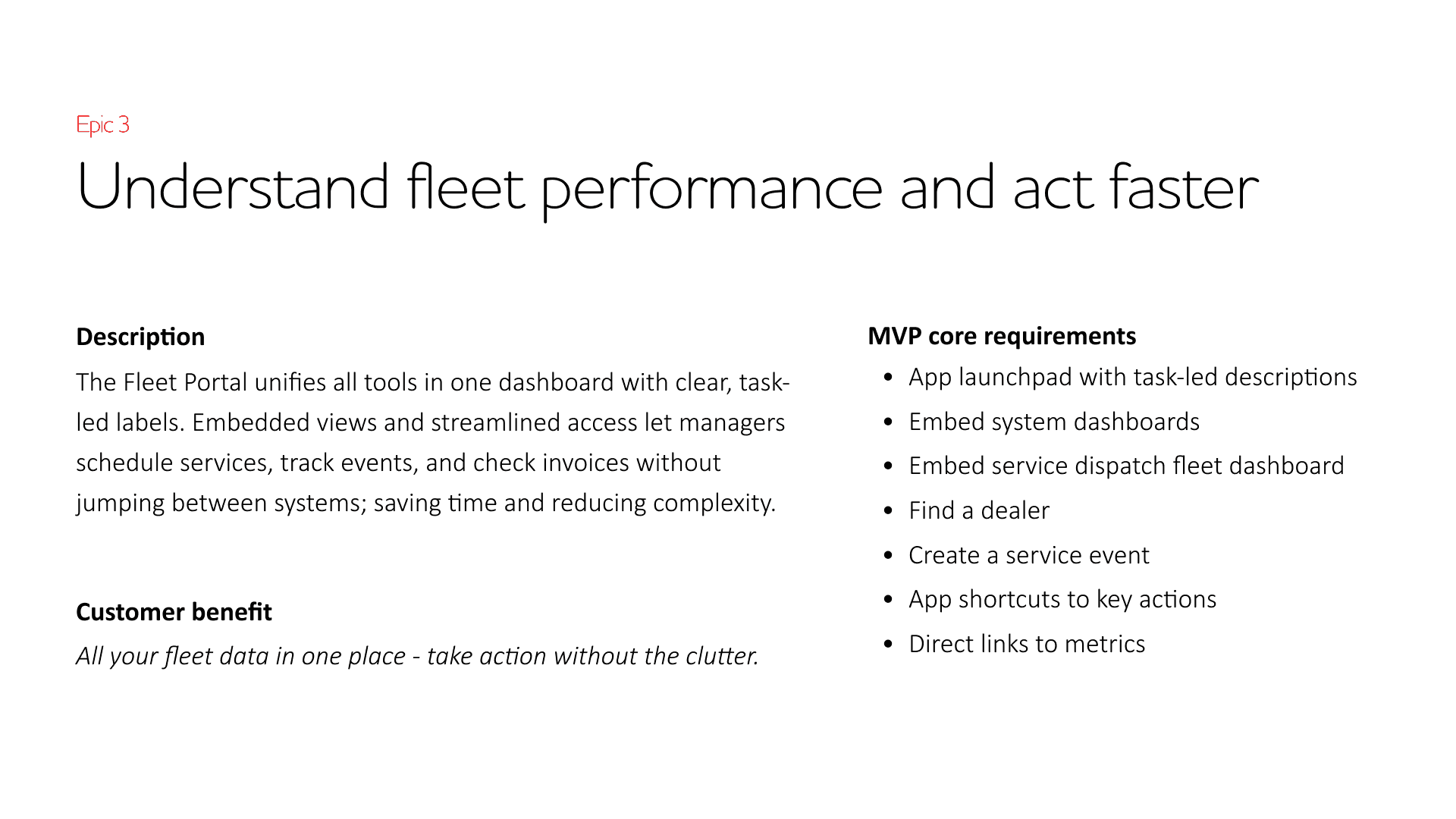
The vision was divided into 6 epics, each with an aspirational customer benefit and list of MVP requirements. These requirements would later be prioritised to create the final sprint plan and future roadmap.
Example of a proposed epic
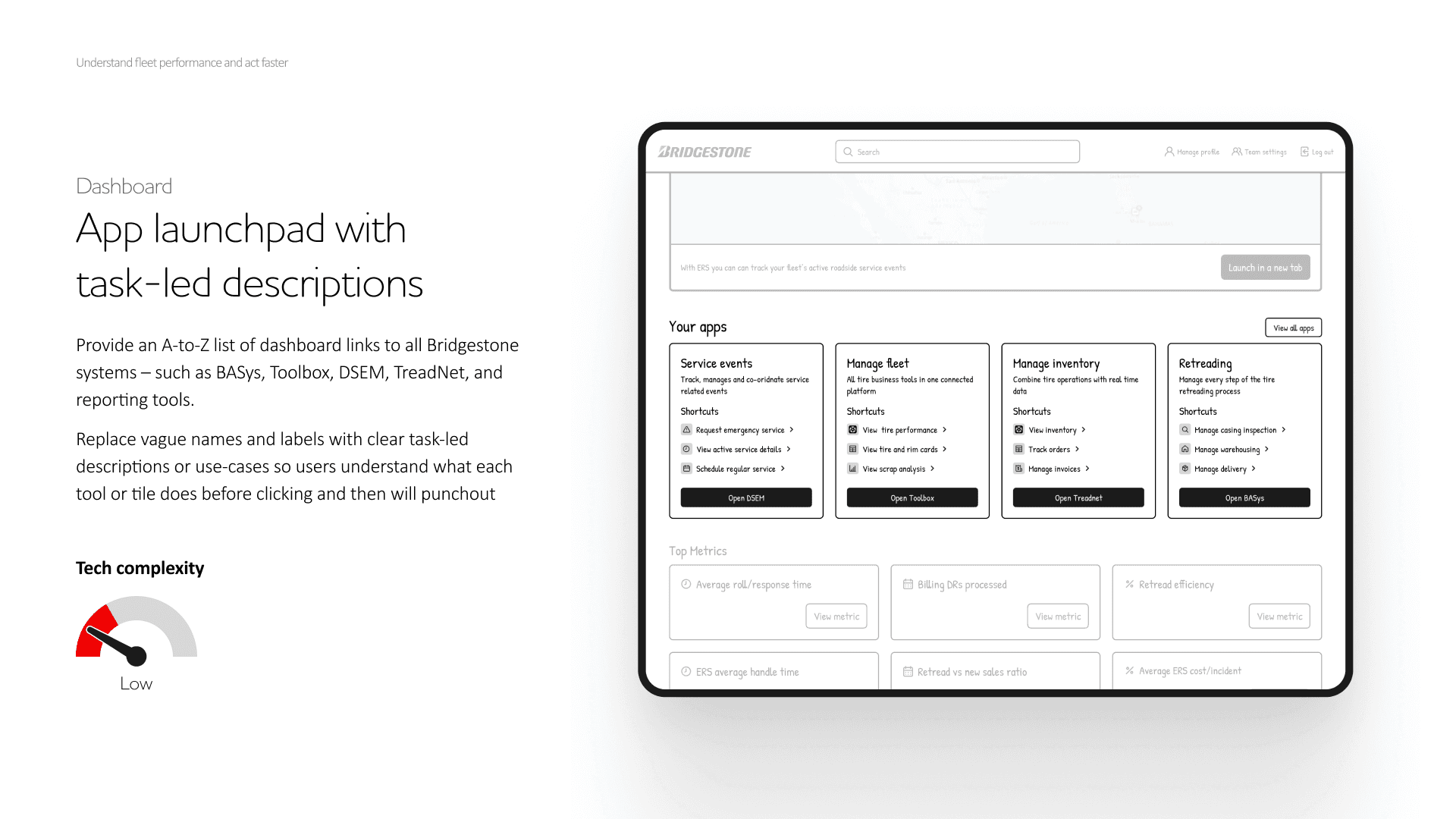
Each MVP requirement was presented as a concept with wireframe mock ups (the client requested that we stick to wireframe level at this stage as high-fidelity mock ups had caused internal confusion before).
Example of a MVP concept card
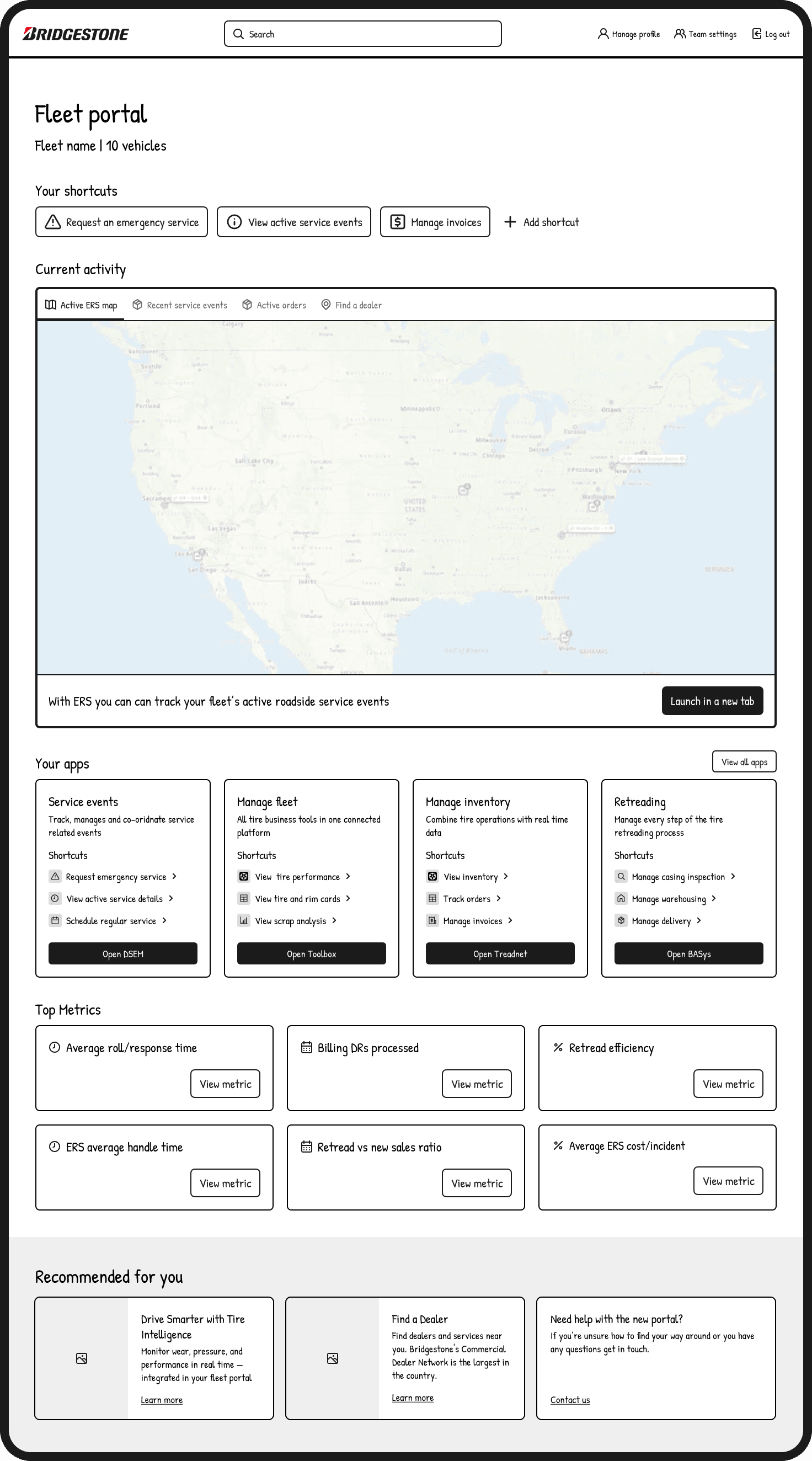
Wireframe of portal with all vision concepts combined
Including task shortcuts, embedded system dashboards, app launchpad, top metrics, and resources. All of this information was previously spread across at least 8 separate websites, apps, and tools, each with its own login and onboarding process.
Moving into the 'Make it real' phase of the project, we launched the following sprints after internal prioritisation (documented in Productboard).
Dashboard (using the wireframe above as a starting point)
SSO/Onboarding
Admin and settings
Bridgestone had a freshly-launched DS (named Kumiko), so that enabled us to move from wireframing to final screen designs pretty efficiently.
Alongside this work, our strategy lead worked with the client to build out a data model, manage the backlog as part of the overall roadmap, and defining roles and permissions for the new portal.
The designs
(aka what we created to make things easier for Fleet Managers)
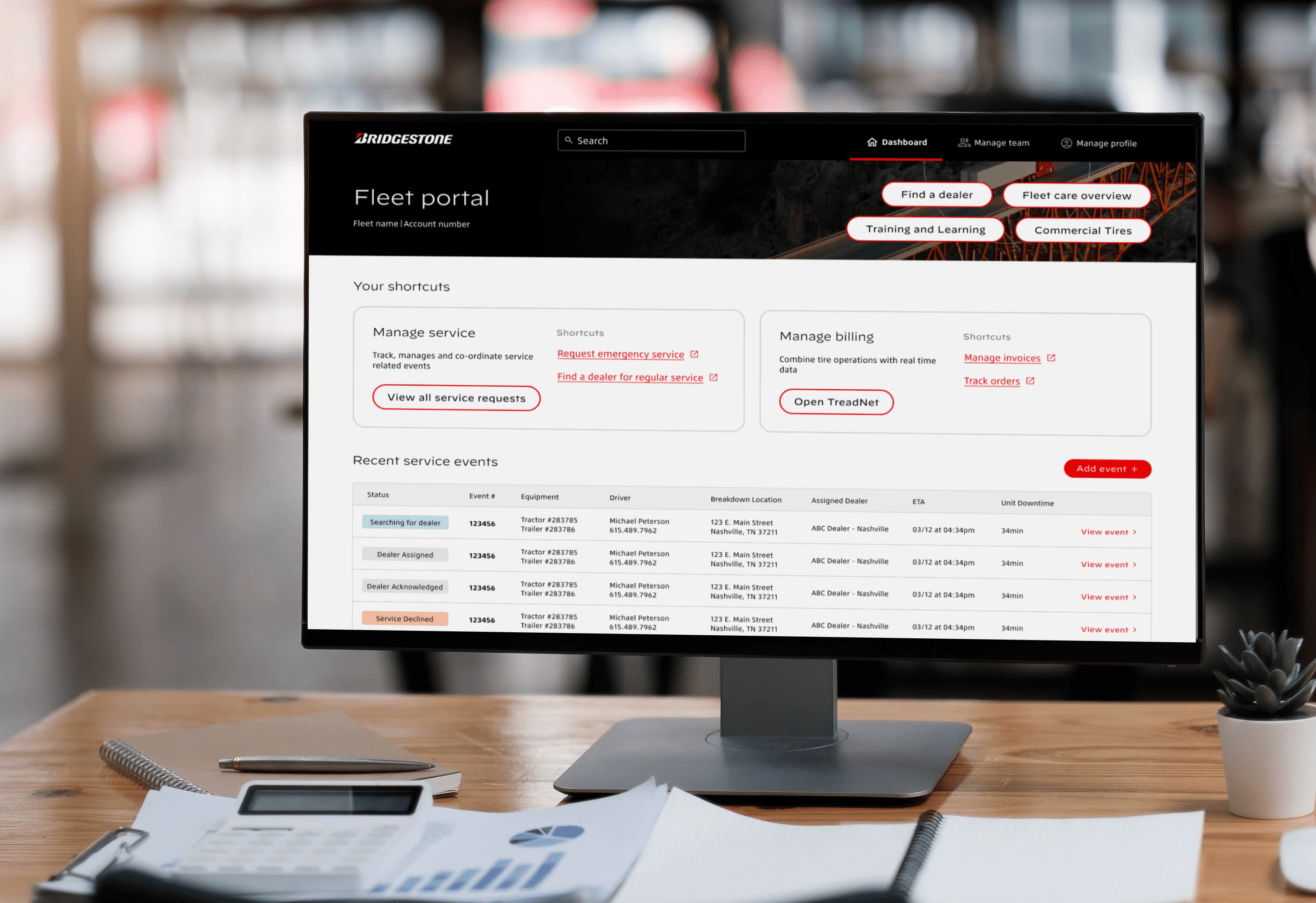
Fleet portal dashboard
Delivered as part of MVP 0 (core), the new Fleet portal dashboard is the first step in creating a true one-stop digital pit stop. Users have effortless access to the most important tools, recent service events, other apps, resources, and account settings.
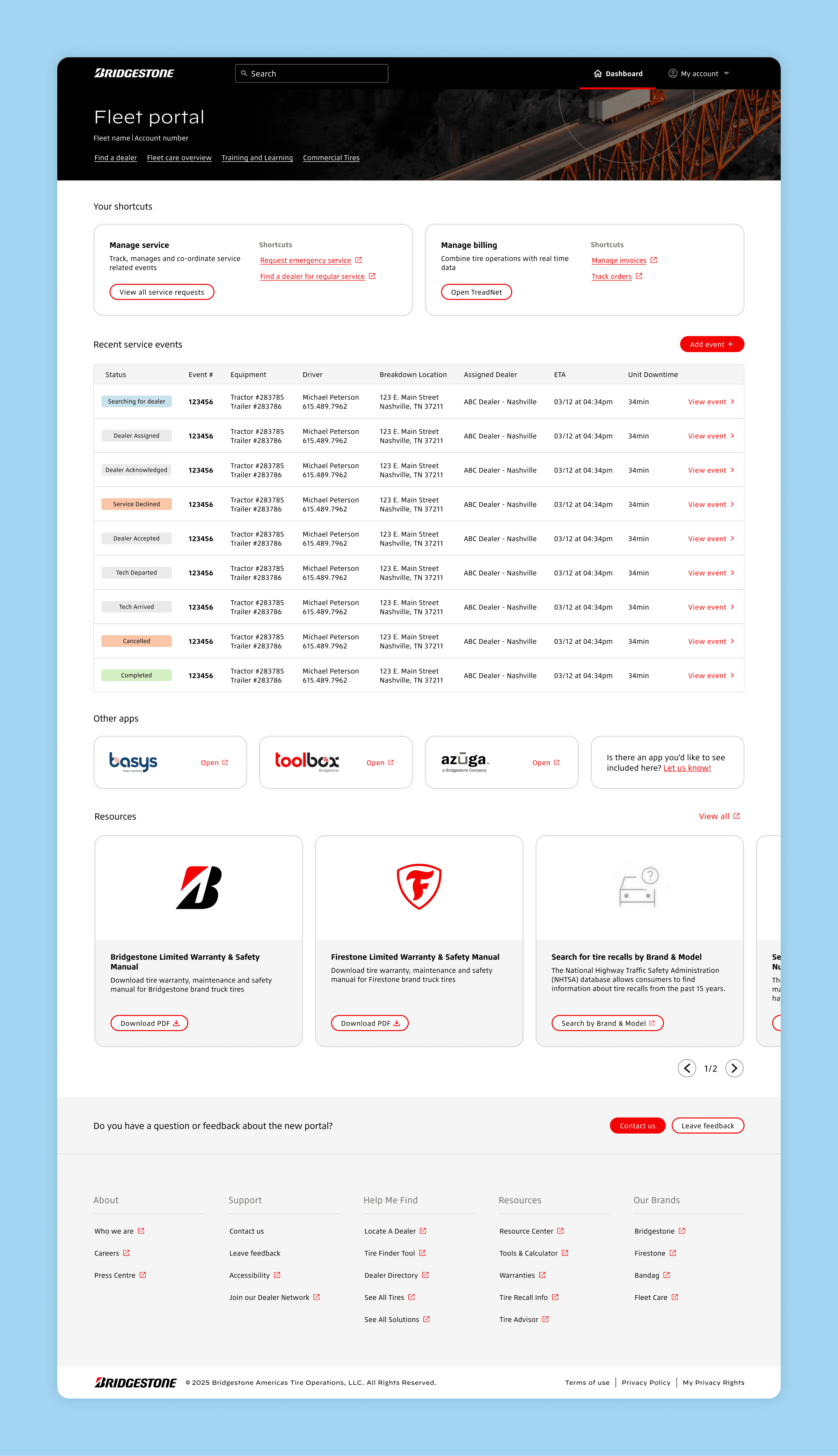
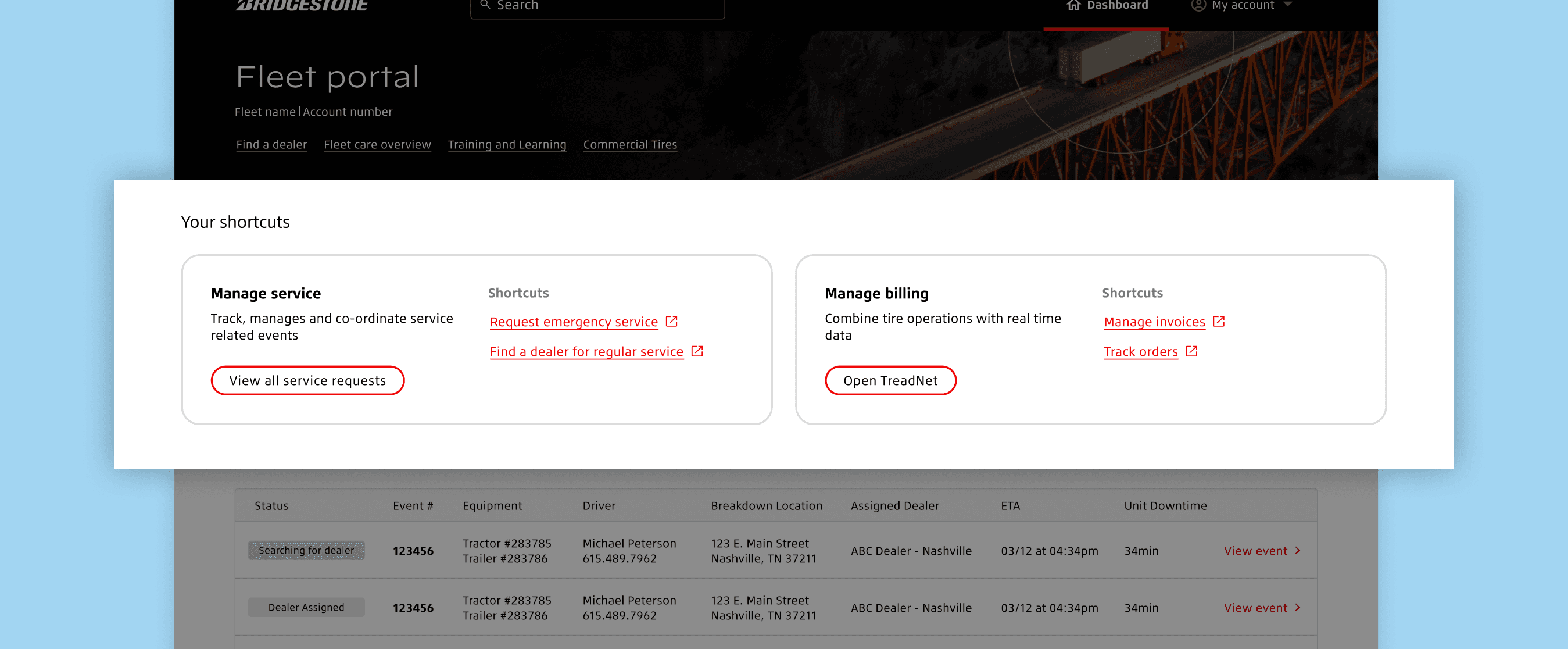
App shortcuts
From the dashboard, app shortcuts allow users to seamlessly access apps and high-frequency tasks with one click. These are task-based shortcuts and will initially include the first tools with full SSO-integration, requiring no further log ins.
(Unfortunately due to unexpected tech complexity, it wasn't possible to launch the MVP portal with all four tools integrated with SSO but we designed this section with future updates in mind - eventually changing to a 4 card layout when all four tools have been integrated).
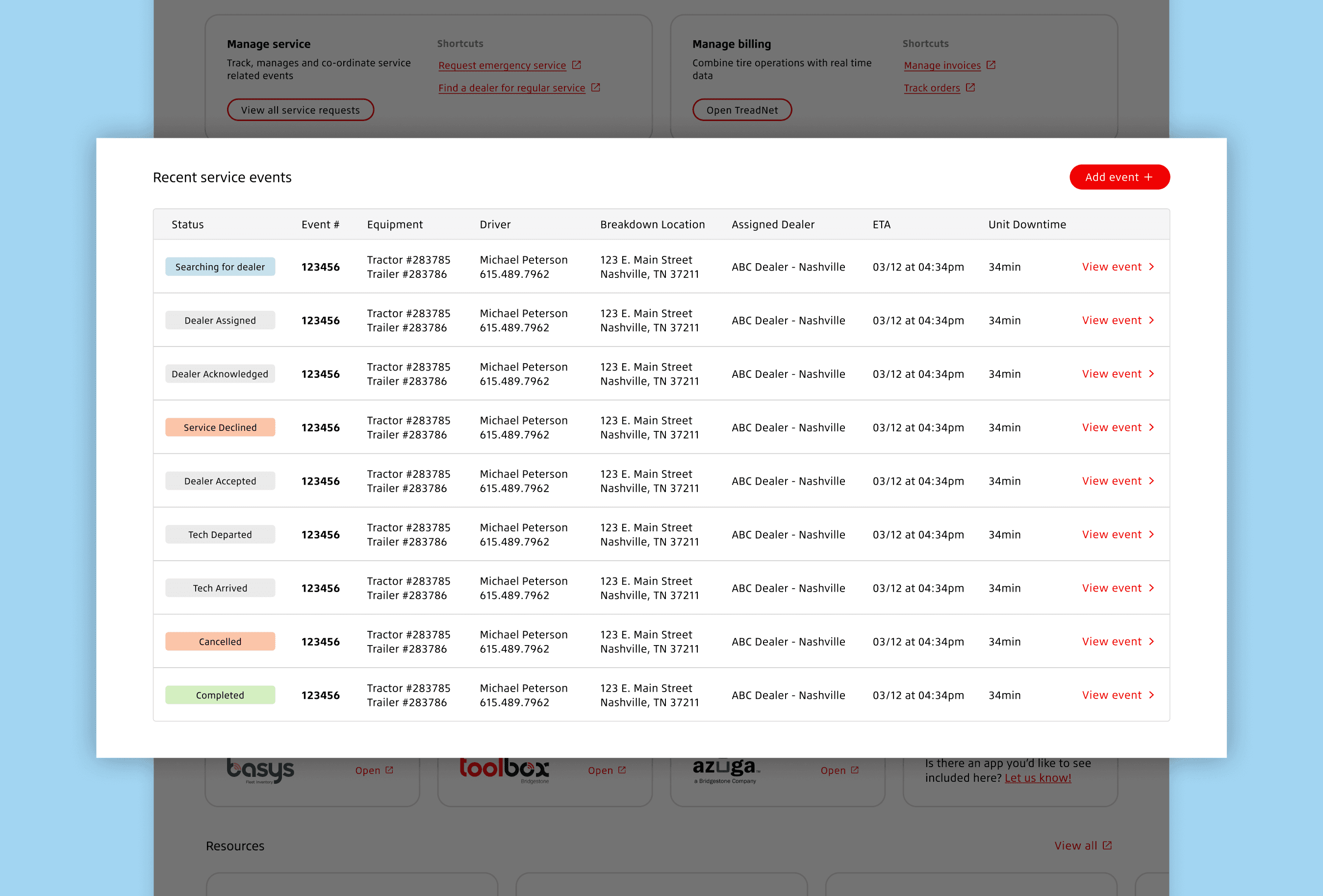
View service events
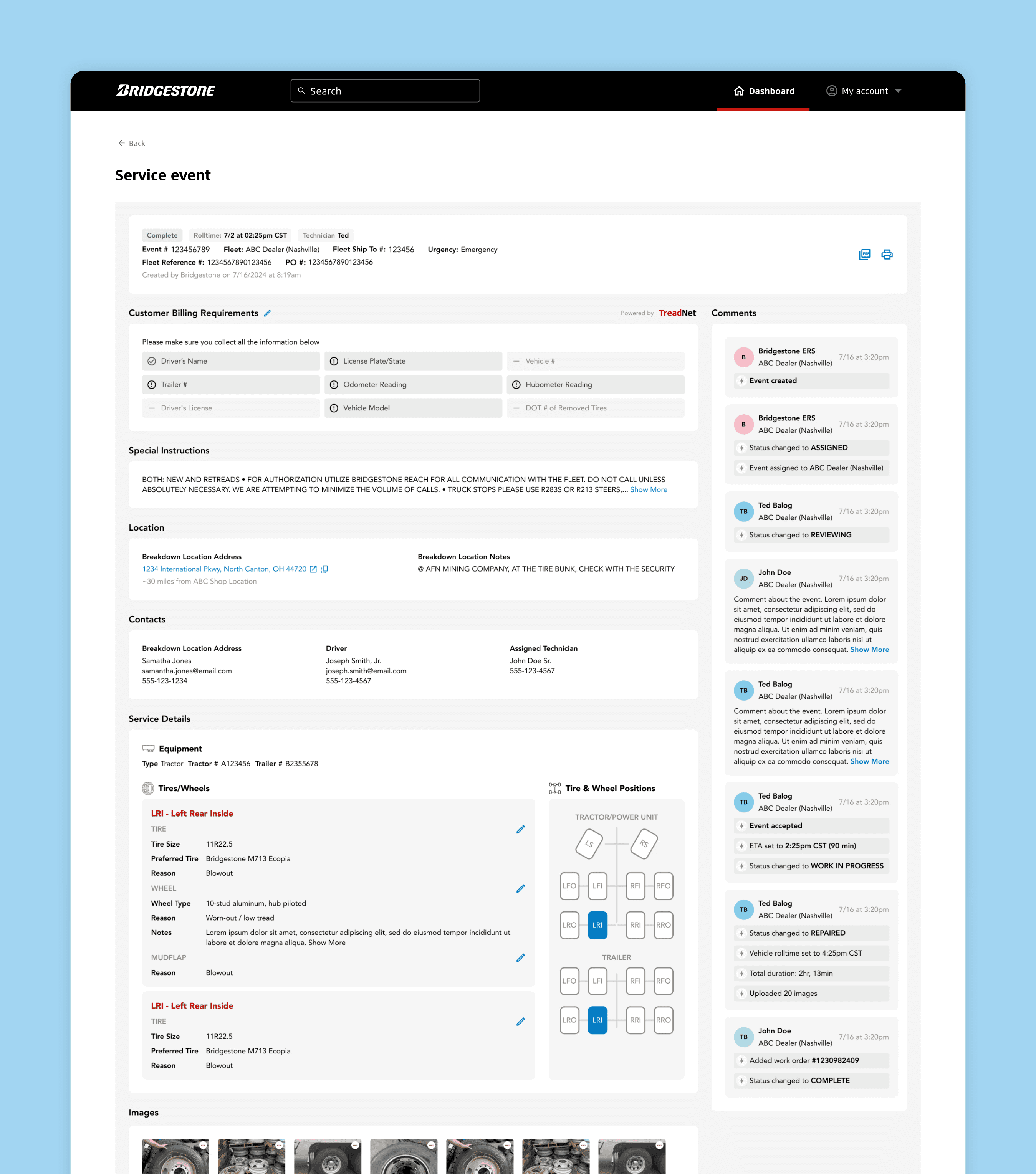
Users can view a list of their most recent service events and submit a new request through the Fleet Care Webform. They can also open each service event to view more details and manage the event (via an embedded tool with future plans for full integration)
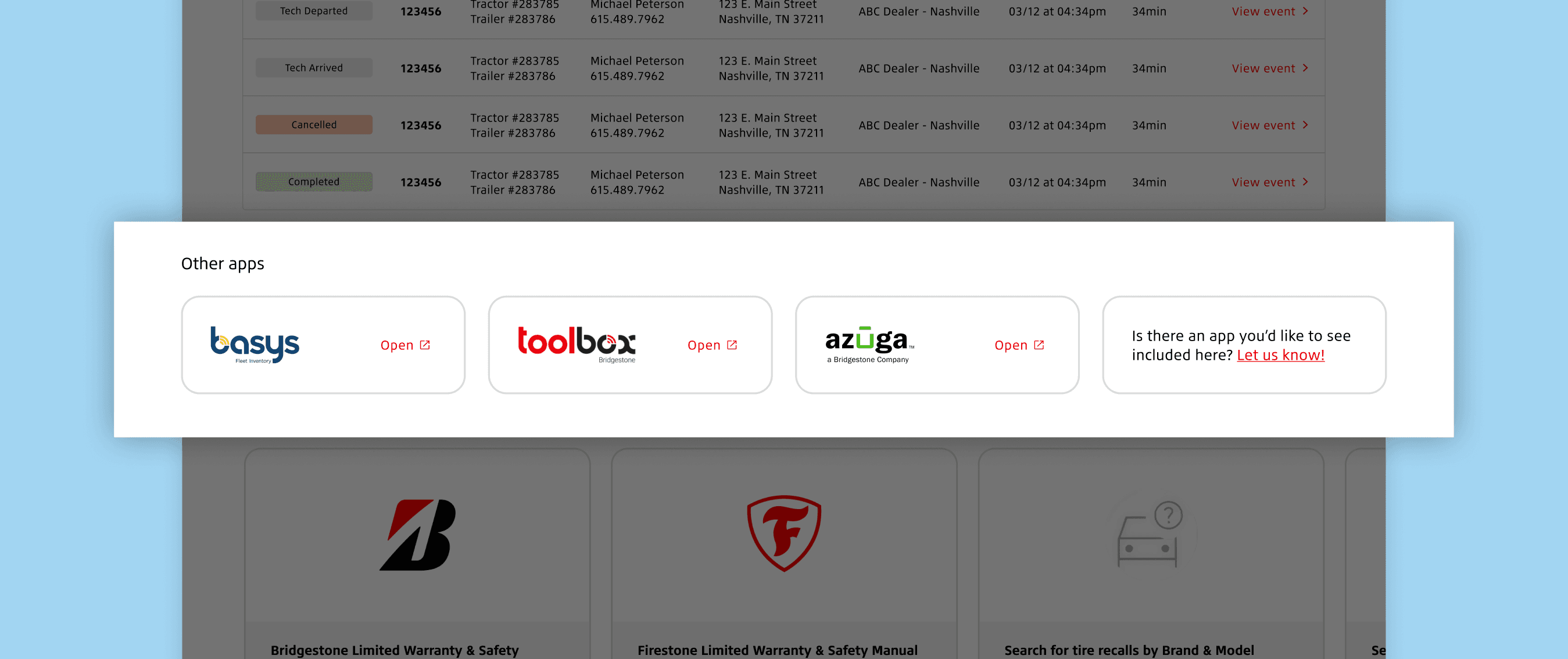
Other apps
While full SSO integration continues, users can initially launch other Bridgestone apps directly from the portal, reducing their dependency on bookmarks or remembering tool names. They can also request additional apps be added to this section, ensuring the portal becomes a central hub for a fleet managers' workflow.
The insights
(aka what we learned and what we'd do differently)
Fleet Managers think in tasks, not products. The portal made more sense to them when organised around real jobs (e.g. book a service) instead of tool names
iFrames are an accessibility and usability nightmare. If anyone ever suggests them as a quick win, be ready to push back IMMEDIATELY
Involving the right people early and often in the process avoids surprises and keeps a project moving
"Do it with them, not to them” a quote from the client that sums up the importance of including the customer at the heart of everything we do
Don’t assume developers know to properly use Figma even if the they agreed to use it… confirming this upfront will save a lot of headaches and provide more time for training.
When working across different time zones, record all client calls and sharing with the wider team to ensure we are all on same page. Avoids miscommunication or something being lost
The impact
(aka what our work achieved and how users reacted to it)
Will update as more feedback/stats roll in (pun intended).
The TL:DR
(aka when you're very busy or don't like long pages)
Goal: Help Bridgestone become the easiest commercial partner for Fleet Managers by creating a unified Fleet Portal that brings tools and data into one seamless experience.
Problem: Fleet Managers were stuck juggling disconnected systems, relying on manual workarounds and contacting support teams, which drove up effort, costs, and frustration.
What we did: Ran interviews, audits, and workshops to understand “day in the life” of fleet managers. Then defined success criteria, mapped the product model + IA, and shaped an MVP vision and roadmap.
Solution: A portal grounded in real customer needs, delivered through prioritised epics like SSO/onboarding and dashboards. A roadmap providing strategic direction for future releases
Impact: First release to limited number of customers. So far reduced login friction. Less external support needed. Full launch 2026.
Key lessons: Fleet managers think in tasks, not tools. iFrames are terrible. “Do it with them, not to them”. Confirm everyone who needs to can use Figma. Record all client calls to manage time zone differences.